Project Overview
ServiceNow To-Do was designed to help employees and managers review, manage, and complete tasks and approvals more efficiently within the Employee Portal. The project focused on improving high-volume approval workflows, especially for users who needed to act on multiple similar requests without repeating the same approval process one task at a time. My work included discovery workshops, research synthesis, user flow mapping, Figma prototype testing, interaction design, visual design, and design-system alignment. The solution introduced clearer bulk selection, improved filters, stronger task context, specific error messages, confirmation feedback, history/past actions, and task-level delegation. As part of the broader To-Do experience, Outlook integration was also included to help users schedule focus time, manage learning tasks, receive reminders, and stay on track without switching between tools.
ServiceNow To-Do: Bulk Approval & Task Workflow Redesign
Redesigned high-volume task and approval workflows to help employees and managers review, approve, reject, and delegate work faster with more confidence.

MY ROLE
Role: Senior UX/UI Designer
Company: ServiceNow
Platform: Enterprise Web & Mobile
(Internal Employee Experience)
Tools: Figma, Miro,WCAG 2.1 AA
SUMMARY
The redesigned To-Do experience balanced speed with confidence. Through discovery workshops with HR, Legal, and Sales, and usability testing with Legal and CPQ users, we identified pain points around task overload, selection clarity, missing context, mobile limits, and unclear feedback. The final design improved bulk approvals with clear task selection, Approve All and Reject All actions, required comments for rejection, optional comments for approval, specific error messages, task history, and delegation options. Outlook integration extended the experience by supporting focus time, reminders, and learning tasks so employees could stay organized and complete important work with fewer distractions.
To- Do Bulk Approval
Problem Statement
Managers (our primary persona) often receive many similar approval tasks, such as timesheet approval, software access requests. In the current experience, these requests must be reviewed and acted on one at a time, creating a repetitive, time-consuming workflow. This makes high-volume task management inefficient and increases the effort required to complete routine approvals.
Current state and challenges
-
Many bulk approval tasks are simple enough to act on directly from the task title and short description, but some still require users to review additional details before making a decision.
-
Users need a fast way to select multiple relevant tasks while avoiding accidental action on the wrong items.
-
Managers with large task queues (20+ items) need better ways to sort, filter, and focus on the most important work.
-
Bulk approval actions involving 10 or more tasks can take 5–7 seconds to process, which may create uncertainty if the system does not clearly communicate progress.
-
The current workflow does not provide enough support for related actions such as delegating tasks, reviewing past actions, or understanding exactly why an action failed.

Discovery Workshop & Affinity Mapping
At the start of the project, we facilitated a discovery workshop with stakeholders from HR, Legal, and Sales to understand how different teams manage incoming To-Do tasks, approvals, and daily workflow needs. The goal was to identify common pain points across departments, understand how users prioritize tasks, and uncover where the existing approval process created friction.
After the workshop, I synthesized the feedback into an affinity map to group similar observations, needs, and pain points. Key themes included task overload, difficulty finding high-priority items, lack of context before approving, repetitive one-by-one approvals, need for delegation, unclear error feedback, and the importance of seeing history or past actions. These themes helped shape the design direction and informed the features we prioritized in the To-Do bulk approval workflow.

Competitive Analysis
To inform the ServiceNow To-Do bulk approval experience, I reviewed task and approval patterns across ClickUp, Jira, monday.com, and Airtable. Monday.com was useful because it supports selecting multiple board items for batch actions, while ClickUp and Jira helped validate common bulk action patterns.
Key Takeaways
Bulk actions work best when users can clearly see selected items, available actions, task eligibility, confirmation states, and error recovery. This review helped shape the final design direction: visible checkboxes, selected-task counts, eligibility indicators, clear Approve All / Reject All actions, required rejection comments, task-level delegation, loading states, and specific mobile error messages.
Solution
-
Add filters to help users manage large task lists
-
Selecting and processing a large number of tasks could take longer. To reduce uncertainty, we added a loading/progress state so users understood the system was processing the bulk action instead of assuming the page was frozen.
-
Delegate Task is for one specific task.
-
Set PTO Delegation is for a time-based delegation rule across tasks during an absence.
-
Show progress feedback for long-running bulk actions
-
Use specific, actionable error messages instead of generic errors
-
Add a history view so users can review past approvals and delegated tasks
Bulk Approval Flow Chart

Bulk Approval Design


Figma Prototype Usability Testing
After the initial discovery workshop and affinity mapping, the team tested the Figma prototype with users to validate the bulk approval workflow before launch. The goal was to identify any critical or catastrophic usability issues while the feature was still in development, and to capture additional usability improvements that could be addressed after launch.
6 Participants
4 Legal users, 2 CPQ users
During Figma prototype testing, we identified key workflow and technical constraints. PTO delegation was moved to a future release because not all tasks could be delegated to one person; some needed to go to a manager, while others needed a teammate. For MVP, we kept task-level delegation only.Users also requested an undo option, but due to timeline limitations, it was documented for the next phase.
Mobile
Legal users noted that some tasks were eligible for bulk approval, while others required individual review. On mobile, relying only on checkbox states became difficult because users had to scroll through long task lists and could easily miss which tasks were selectable. To make the experience clearer, we separated task types and added stronger eligibility indicators so users could quickly understand which tasks could be included in bulk approval.
Because of mobile space and technical constraints, bulk approval was limited to 10 tasks at a time. To prevent confusion, we added clear helper text and a specific error message explaining the limit and how users could continue.
The research showed that users wanted speed, but not at the cost of confidence, so the design needed to balance bulk efficiency with context, selection clarity, feedback, and control.
Design Changes Based on Testing
Based on the testing findings, I refined the design to make bulk actions clearer and safer. The updated direction included stronger bulk selection labeling, clearer selected-item visibility, improved filtering for long To-Do lists, a review step before completing bulk actions, specific error messages, confirmation feedback, history/past actions, and a delegate option for tasks that needed reassignment.

Connected Workflow: Outlook Focus Time Integration
Problem
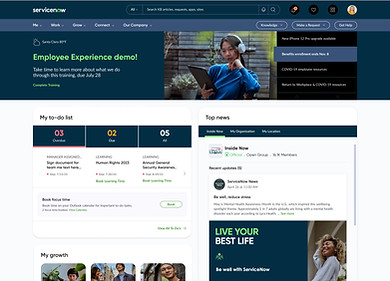
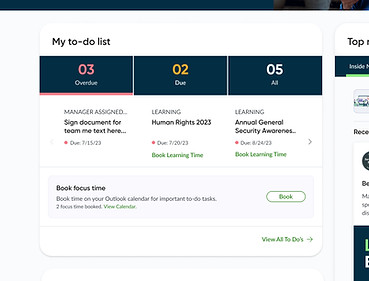
Employees often need dedicated time to complete important To-Do tasks, but competing meetings, notifications, and daily work can make it difficult to stay focused. To support task completion, we introduced Outlook Focus Time from the Home Widget and Learning page, allowing users to schedule uninterrupted time for high-priority work.
This helps users complete important tasks on time, reduce distractions, and create a more structured workflow for learning and task completion.
Solution
-
Booking Focus Time:
A user can set a time duration for focus sessions dedicated to completing important to do tasks from the home widget. -
Learning Tab:
In the "Learning" tab, users can set a time duration for focus sessions dedicated to learning tasks.
Each learning task will have details such as the topic, link, and a set duration for learning. -
Notifications and Reminders:
The application will send notifications or reminders to users about upcoming focus sessions or learning tasks.
By integrating Outlook with To-Do, users are able to create tasks directly from the portal, making it easier for them to stay organized and manage their workload more efficiently. With this feature, users can seamlessly transfer their emails, events, and deadlines into a task list, allowing them to prioritize their work more effectively and stay on top of their to-do list. This integration helps users save time and effort by eliminating the need to switch between different applications and ensures that they never miss an important task or deadline.
Within the "Learning" tab, users have the ability to customize their focus sessions by setting a specific duration for learning tasks. Each task is defined by a topic and accompanied by a relevant link. Additionally, users can allocate a predetermined duration for each learning task to ensure they stay on track and maximize their productivity while learning.
Our application is designed to help users stay focused and on track with their learning goals. To achieve this, we have included a powerful notifications and reminders feature that keeps users informed of their upcoming focus sessions and learning tasks. When a focus session or task is scheduled, the application will automatically send a notification to the user, providing them with all the necessary details to get started. This could include information such as the time and date of the session, the duration of the task, and any specific instructions or resources that may be required. By receiving these notifications and reminders, users can stay on top of their learning schedule and maintain the motivation needed to achieve their goals.
Flow Chart





What I’m Proud Of
-
Turning a repetitive, time-consuming workflow into an elegant and scalable solution
-
Empowering managers and decision-makers to work faster without sacrificing clarity
-
Building a design system pattern now reused in other ServiceNow enterprise tools